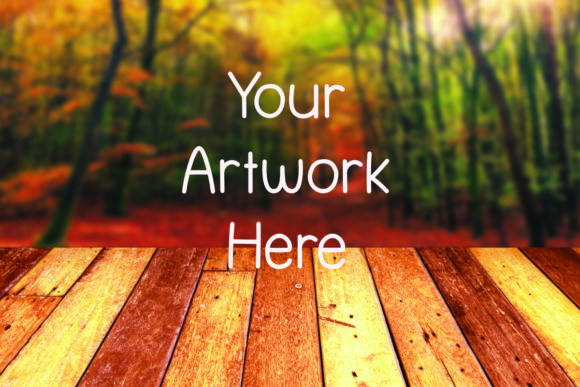
Visual Impact Meets Efficiency: Working with a Wood Floor and Fall Mockup Background
Every designer, marketer, and product creator knows the moment when a flat digital file needs to feel tangible. You have a pattern for a pillow, a cover design for a journal, or a new artwork that looks compelling on a white screen, but buyers need to imagine it in a real setting. That’s where a well-crafted mockup background changes the conversation. The Wood Floor and Fall Mockup Background addresses this need with a single, carefully composed scene that blends warm seasonal elements with a neutral wooden surface. It’s not a complex template with dozens of layers; it’s one high-resolution JPG that becomes a reliable stage for your product visuals.
This asset offers a specific aesthetic: a top-down view of wood planks accented by scattered autumn leaves, pinecones, and subtle seasonal details. The composition is deliberate but not cluttered, giving you enough visual interest to suggest a fall atmosphere without overpowering whatever you place on top. For independent creators and small teams who need to produce professional-looking catalog images, social media posts, or listing photos quickly, this kind of resource can save significant time and money compared to staging and photographing physical mockups.
What You’re Actually Getting with the File
When you purchase this mockup, you receive one zipped JPG file. The specifications are straightforward: 6000 by 4000 pixels at 300 DPI. That resolution means you can use the image for both digital display and high-quality print collateral. It’s large enough to crop, zoom, or adapt to different aspect ratios without immediately losing clarity—important when a single listing image needs to work across a website thumbnail, an Instagram post, and a print catalog.
The file is not a layered PSD or an editable template in the traditional sense. The scene itself is fixed: the placement of the wood grain, the position of leaves, the lighting, and the depth of field are all baked into the JPG. This is a key distinction. You won’t be moving objects around or turning off the autumn elements. Instead, you place your own design on top of the mockup using any image editing software that supports layers—Canva, Affinity Photo, Photoshop, or even free alternatives like GIMP. The product descriptions on the mockup are display-only and not included, which is standard for this type of resource.
Cohesive Seasonal Branding Without the Shoot
Many product-based businesses need to rotate visuals to match seasons, holidays, or marketing themes. Organizing a full photoshoot for autumn-themed product images involves sourcing props, managing lighting, and editing dozens of photos. This background eliminates that variable. Because the fall accents are present but understated, the mockup works for items that aren’t explicitly autumn-themed too—think neutral-toned notebooks, kitchen linens, or minimalist art prints that benefit from a warm, organic backdrop without being tied to pumpkins or overtly festive motifs.
Realistic Wood Texture and Lighting
The wood surface isn’t a flat color block. Inspection of the image shows natural grain variance, subtle shadows near the leaves, and a soft, diffused light that suggests an indoor setting near a window. That realism helps the final composite image feel more authentic. When you overlay a flat design—say, a graphic for a tote bag or a mug—the slight unevenness of the wood and the directional lighting create a believable integration. In many cheaper mockups, surfaces look digitally generated and plastic-like. Here the photographic origin of the scene works in your favor, especially if you adjust the blending mode or opacity of your design to pick up faint texture hints.
Versatility Across Product Categories
Often, mockups are built for one type of product. A frame mockup only displays art; a mug mockup only shows drinkware. The Wood Floor and Fall Mockup Background isn’t pre-loaded with product templates. This lack of constraints turns into flexibility. You can display anything flat or semi-flat: pillows viewed from above, printed fabrics, book covers, greeting cards, stationery sets, floral arrangement concepts, small home decor items, or digital art prints. The top-down perspective and ample empty wood space let you scale your design to fit various dimensions. A single background can serve an entire fall collection, which maintains visual consistency across your store or portfolio.
Real-World Use Cases and Who Benefits Most
This mockup is particularly useful for people who need to produce multiple product images on a tight schedule. Etsy sellers preparing autumn product listings, for example, can photograph one physical item and then use this background to create complementary lifestyle shots without additional setups. Print-on-demand designers can show how patterns look on different surfaces by swapping designs on the same wood scene, giving customers a sense of scale and environment. Freelance graphic designers can present logo applications or brand collateral in a warm, approachable context that feels less sterile than a white desk mockup.
Bloggers and publishers creating seasonal content—like fall recipe cards, printable wall art, or ebook covers—can use the image to give their digital downloads a tactile, printed appearance. The 6000px width means you can even crop into a tighter composition if you need a square format for a promotional graphic, and the wood floor remains sharp enough for use on larger screens or printed flyers.
For marketing professionals, the asset fits into email headers, social media banners, or website hero images that require a seasonal refresh without a full custom shoot. Because the mockup is delivered as a simple JPG, the learning curve is essentially zero. You don’t need advanced Photoshop skills; Canva’s drag-and-drop interface handles the entire process, making it accessible to small business owners who do their own marketing.
Quality and Consistency Considerations
In terms of technical quality, the file’s resolution and DPI hold up under scrutiny. While you’re receiving a single image, the fact that it’s photographic rather than rendered means edges, shadows, and color gradients behave predictably when you add text or graphics. One thing to note: because the background is non-editable, you can’t alter the wood color, remove leaves, or change the direction of light. If your brand palette clashes heavily with warm orange and brown tones, this particular scene may not integrate seamlessly. Testing your designs on a sample before committing to an entire collection makes sense.
Repeated use is a practical advantage. Mockup photography can get expensive if you continually purchase new scenes for each product launch. By reusing this background across multiple listings, you create a subtle, consistent signature style while reducing costs. The risk, however, is visual fatigue if you rely on it too heavily. Seasoned sellers often keep a few different mockup styles in rotation to avoid all product images looking identical.
How to Place Your Design Effectively
Because the file isn’t a smart object template, your workflow involves opening the JPG in your preferred software, adding your design as a new layer, and using transform tools to position and scale it. For flat items like art prints or cards, you can use a slight drop shadow with low opacity to mimic the natural shadows already present in the scene. If you’re showcasing something thicker—like a hardcover book or a mug—you might need to warp or distort your design layer slightly to match the perspective, though the top-down view makes this less critical than on angled mockups.
For fabric products such as pillows or tea towels, pay attention to how the leaves intersect with your design. Sometimes the charm of the mockup comes from the seasonal elements peeking around your product. Other times, you might want to mask out leaves that distract from key details. Since the file is a single layer JPG, you can’t simply hide them, but you can clone them out or crop the scene tighter if necessary. This extra step is a trade-off for the simplicity and affordability of the asset.
Potential Limitations to Keep in Mind
Transparency in evaluating tools means acknowledging what this mockup doesn’t do. It won’t replace a full Photoshop mockup with isolated shadows and reflection layers. If you need to change the surface to a different wood stain or swap the background to a winter scene, you’ll need a different resource entirely. The JPG format also means no alpha channel: the background is opaque, so you can’t easily extract the wood floor. The autumn theme, while beautifully executed, has a shelf life. It’s ideal for September through November, but might feel out of place for spring product launches.
The file size might also be a consideration for those with limited storage or slow internet connections, though once downloaded, the 6000x4000 pixel image is easily manageable on modern computers. Additionally, while the description states you can use programs like Canva, the quality of your final image depends heavily on how you handle blending. Simply pasting a design on top without adjusting shadows or color temperature can look flat and obviously composited. Skill matters, even with a pre-made background.
Long-Term Value for Creators and Small Businesses
When you assess digital assets from a return-on-investment standpoint, the cost of this mockup is negligible compared to hiring a photographer or buying multiple product-specific mockup templates. For entrepreneurs testing new product lines or seasonal collections, it’s a low-risk way to elevate presentation without upfront inventory or sampling costs. The file doesn’t expire, and you can reuse it indefinitely across different designs, which makes it a practical addition to a growing toolbox of visual resources.
The key is matching the mockup’s strengths to your specific needs. If your products align with warm, natural, or rustic aesthetics, and you value a straightforward, no-distraction backdrop that still carries seasonal personality, the Wood Floor and Fall Mockup Background fills that niche. It’s not a do-everything solution, but it executes its specific purpose reliably. In a marketplace crowded with overly generic or highly stylized mockups, its restraint and photographic quality give it a professionalism that helps smaller brands appear more established.
Ultimately, successful product visuals hinge on context. A design that looks abstract on a white background often becomes tangible and desirable when placed on a surface that suggests real life. The wood floor provides structure; the fall elements provide warmth. Together, they create a frame that invites the viewer to imagine owning the item. And for a single, reusable JPG file, that’s a worthwhile capability to have in your creative arsenal.